Tampilkan postingan dengan label scripting. Tampilkan semua postingan

Minggu, 19 April 2009

I chat, therefore IM ;P

[UPDATE: July 28, 2009] I added the new SLURL to Mona's place.

[UPDATE: July 29, 2009] The bots were featured on New World Notes! Here's the link: Meet April, the Bot Who Learns To Speak As She's Spoken To

I want to tell you about something we've been working on with Sql for a while. We created and now take care of two learning chat bots in SL. Sql does most of the technical stuff, like linking chat bot engine to SL, programming the bots, fixing bugs etc., and I'm in charge of 'soft' responsibilities, like managing bots' looks and profiles, cleaning their logs, a bit of marketing etc. Together we brainstorm new ideas and discuss possible implementations of new functions. These bots have been in SL for a few days already, so you might have come across them, but let me tell you more in case you haven't.

Second Life Chat Bots - April and Mona

Our bots are April Scientist (English language) and Mona Scientist (Polish language). They both started with no knowledge and they learn as people talk to them. Then they try to have an intelligent conversation basing on what they learned. The more you talk to them, the more they know! If the bot repeats after you, it means she's not sure what the reply should be. That's when you should teach her the proper reply (answer her properly). When talking to the bots, you have to be understanding. People might teach them various stuff and bots might say inappropriate things. Teach them something nice instead. Also, you have to remember that April and Mona are experiments in beta stage, so unexpected errors might happen.

To talk to the bots on main chat you should start your every sentence with bot's name, eg. 'April hello'. Otherwise the bot won't listen to you. To talk with the bot on IM, just message her like you would normally do (without her name in the beginning). Please restrict to talking in one language to each bot (the language of bot's profile).

April - Second Life Learning Chat Bot (English)
You will find April (English language bot) around my shopping area.

Mona - Second Life Learning Chat Bot (Polish)
Mona (Polish language bot) is currently residing as a librarian at the old Polish Republic sim (it's currently being changed into a new place, so it might be closed sometimes) in her own skybox.

I must admit Mona is currently a bit better, because we do all the tests with her. For example she 'does' some librarian chores now (walks from place to place and jumps on poseballs to get animated), and soon she's going to have her own 24-hours routine. We hope to do the same with April one day.

Enjoy talking to the bots and feel free to paste some fun conversations in the comments here (there's going to be lots of them, trust me) :)

Residents' favourite scripter

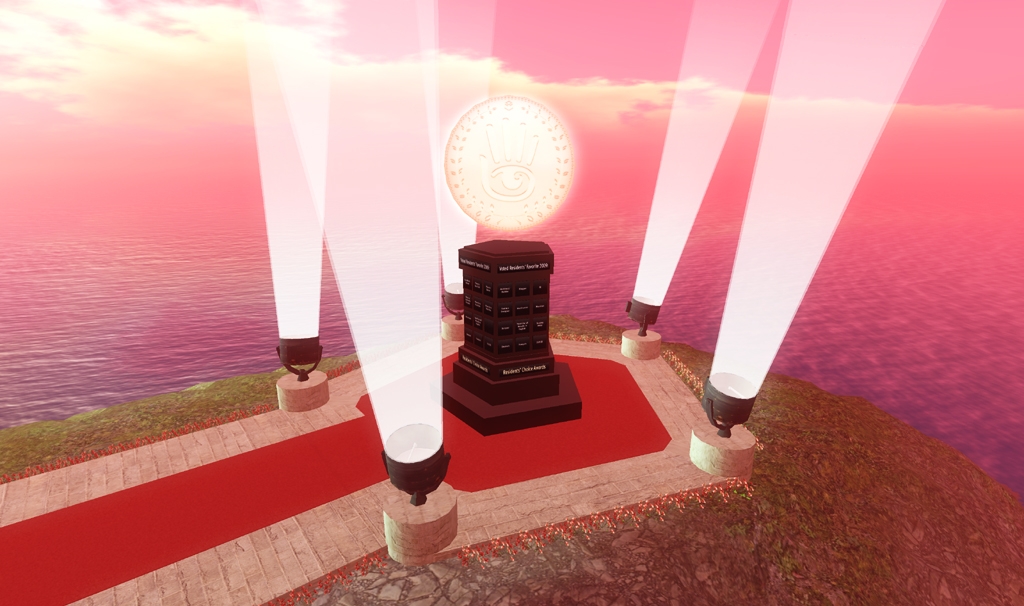
Today I have some great news to share :) I'm very happy and proud to announce that Sql Miles won the Resident Choice Award 2009 in the Favourite Scripter category. Yay! If you ever came across his scripts, you know he fully deserves the award. Sql mainly does commission work but he's best known to SL community as the creator of uTV - probably the most user-friendly SL TV ever (#12 rank on XstreetSL!). You might also remember his transportation system made for COP14 conference island in SL, or perhaps, he might have wirtten a script for you - then you know it's first class. There is no script that Sql would have trouble with and the award only proves that - I think the majority of Polish SL community voted for him, and a lot of his customers outside Poland :) Congratulations, Sql, you're the best! :*

Resident Choice Awards 2009 Winner's Circle @ Brampton

Rabu, 20 Agustus 2008

Scripting summer drinks

This is an article I wrote for the latest issue of SL'ang Life magazine. Since it never came out, I adapted the article a bit and decided to publish it on my blog. If the tutorial gets popular, I might write some more :)

Don't get scared or discouraged seeing all the code here - the tutorial is aimed at people who never scripted before, so I'm sure you'll understand it, just go bit by bit. And you are welcome to ask questions in the comments of course. So, here it is.

Summer Drinks

When the weather is hot and sunny, avatars can cool off by drinking refreshing beverages. Unlike real life, after they make their yummy drink, they still have some work to do before it's ready. It's because objects in SL that are supposed to interact with avatars must be scripted. Today we'll learn how to script and animate a summer drink - the easy way!

The first thing to do is to create the drink object. This is where you let your creative power flow freely - I'm sure you'll come up with a yummy looking juice or ice tea. This part is up to you - the tutorial will focus on scripting only. Take time making your drink object, and once you have it ready, let's script!

PREPARATION
Rez your drink on the floor (or table, if you prefer), right-click it, select Edit from the pie menu and go to Contents tab (if you don't see the tab, click the blue More button). You will see there's a button that says New Script - click it. The drink will greet you with 'Hello, Avatar!' phrase and you'll notice a new item in the contents, named New script. Right-click it, select Rename, type in any name you want (for example Drink script) and press Enter on your keyboard. Right-click the script again and this time select Open. You'll see a window with a default LSL script. This is where we are going to work now.

Delete the whole default script (all the text), so that you start with a blank page, and type in:


default
{

}

This indicates the default state that every script must have. When the script is first run (or reset), it enters this state and does what is listed in here. The brackets indicate where the list of tasks starts and ends. We are going to put our tasks inside the brackets.

PERMISSION TO ANIMATE
The first thing we need to do in our drink script is to check whether the object (drink) containing the script is attached to an avatar. We'll use attach event handler, which is activated when an object is attached to or detached from an avatar.

default
{
attach (key id)
{

}
}

Attach event handler has one parameter - a key named id. Parameters in LSL are used to store values important for various functions, in this case a key. Each avatar has a unique key that identifies him in Second Life. So in this case the id parameter stores the key of an avatar who attached the object with the script. If the object is not attached to any avatar, the id parameter will store an empty key: NULL_KEY. We can use that information to tell the script what to do in both cases. If the script finds out that the object is not attached (id stores NULL_KEY), we're not going to do anything (for now). Otherwise (if it is attached), we want the script to ask the avatar for permission to animate him.

default
{
attach (key id)
{
if (id == NULL_KEY)
{

}
else
{
llRequestPermissions (id, PERMISSION_TRIGGER_ANIMATION);
}
}
}

Note that we use "==", not "=" to compare whether two values are equal. The latter ("=") would assign the value to the parameter.

When an avatar attaches an object, the permission to animate is granted automatically (user don't get the dialog box with the question), but the script has to ask for the permission first anyway. To ask for permission we'll use llRequestPermissions function. It needs two pieces of information: whom to ask (we need to give an avatar's key) and what type of permissions it should ask for (there are various types of permissions, like permission to animate, permission to track avatar's camera, permission to take money etc. - they are all described in LSL Portal). We want to request permission from the avatar who attached the object, so we will use the id parameter here. And since we need a permission to animate him, we'll use PERMISSION_TRIGGER_ANIMATION flag. Remember you need to place ; (a semicolon) at the end of every function, otherwise you won't be able to save your script (it will give an error).

HOLD THE GLASS
Now we have to tell the script what to do when the permissions are granted. We need the
run_time_permissions event handler, which is triggered when the avatar responds to permissions request - either gives or doesn't give the permission. That's why we also have to make sure the permission was granted. Run_time_permissions event handler has one parameter - perm. If no permissions are set, this parameter has value of 0. Otherwise it stores the granted permissions flags. So, what we need is a situation where perm == PERMISSIONS_TRIGGER_ANIMATION. To check that we'll use an if statement similar to the one we used in attach event handler (note that else statement is optional).

Once we're sure the permission was granted, we want to animate the avatar, so that he is holding the drink. You can create your own holding animation and place it in your drink's contents or use one of SL built-in animations (they are listed on the wiki). The built-in animation "hold_R_handgun" is perfect for holding a drink and that's what we are going to use. To start the animation, use llStartAnimation function.

default
{
attach (key id)
{
if (id == NULL_KEY)
{

}
else
{
llRequestPermissions (id, PERMISSION_TRIGGER_ANIMATION);
}
}

run_time_permissions (integer perm)
{
if (perm == PERMISSION_TRIGGER_ANIMATION)
{
llStartAnimation ("hold_R_handgun");
}
}
}

LET ME TAKE A SIP
So far, so good, but we still need a bit more scripting. Holding animation is not enough, as we want our avatar to take a sip every few seconds. That's why we are going to set up a timer in our script. Let's say we want the avatar to sip the drink every 15 seconds. We'll use llSetTimerEvent function (set to 15 seconds) in run_time_permissions event handler, right after we start the holding animation. So now when permissions are granted, the script will start the holding animation and then will start up the timer. And you probably have guessed now that we need another event handler: timer, which will be triggered every 15 seconds (the time we set) and where we'll list the tasks to be done. Timer doesn't have any parameters, as it doesn't really need any. Inside this event handler we only need one task: trigger a drinking animation. We'll use again a built-in animation: "drink", but you might want to create your own animation and drag it from your inventory into your object contents.

default
{
attach (key id)
{
if (id == NULL_KEY)
{

}
else
{
llRequestPermissions (id, PERMISSION_TRIGGER_ANIMATION);
}
}

run_time_permissions (integer perm)
{
if (perm == PERMISSION_TRIGGER_ANIMATION)
{
llStartAnimation ("hold_R_handgun");
llSetTimerEvent (15);
}
}

timer()

{
llStartAnimation ("drink");
}

}

I FINISHED DRINKING
The script is almost finished but there's one more thing we need to do - tell the script what tasks to perform when the object is detached from the avatar. We are going to place these in the attach event handler. If the script finds out that the object is detached (id stores NULL_KEY), it should stop the holding animation, stop the drinking animation and stop the timer. To stop the animations, we'll use llStopAnimation function and to stop the timer, we'll set the timer event to 0.

default
{
attach (key id)
{
if (id == NULL_KEY)
{
llStopAnimation ("drink");
llStopAnimation ("hold_R_handgun");
llSetTimerEvent (0);
}

else
{
llRequestPermissions (id, PERMISSION_TRIGGER_ANIMATION);
}
}

run_time_permissions (integer perm)
{
if (perm == PERMISSION_TRIGGER_ANIMATION)
{
llStartAnimation ("hold_R_handgun");
llSetTimerEvent (15);
}
}

timer()

{
llStartAnimation ("drink");
}

}

SAVE
Our script is now ready to save! Click the Save button at the bottom of the window. You should see a message Compile successful, saving... Wait until you'll see another message: Save complete. Note: if you can't save the script because it gives you a syntax error, or any other error, make sure you typed everything correctly. If you accidentally omit one semicolon, or make one spelling mistake, the script won't save. Just go through the script, try to find your mistake (there might be more than one) and click the Save button again.

Once the script is saved you can close the window and take your drink object to your inventory. Right-click it in your inventory and attach it to your right hand (you need to do it only the first time - later you can just use Wear option, as the drink will remember where to attach). You might need to rotate and adjust the glass while it's attached to your avatar. And that's it. Your drink is ready and your avatar should be holding it and drinking properly. Congratulations, you have compiled your first script!

OH, THE POSSIBILITIES
Note that you can script ice cream cones exactly the same way. It's a basic script for eating and drinking in Second Life, although many designers come up with their own, more sophisticated scripts. Which is something you might want to do as well. Just do trial and error, lookup new functions on LSL Portal or try various animations. Scripting is easy and fun and I'm sure you can learn it fast.

If you have any problems with this tutorial, you're welcome to ask a question in the comments. And if you decide to throw a party and serve your freshly scripted drinks, be sure to invite me!

Kamis, 20 Maret 2008

llFunny

I've been a member of the Scripters of Second Life group for quite a long time now and I think it's my favourite SL group so far. Not only are they very helpful but being in the group is sometimes really entertaining too. I couldn't stop myself from posting some of the funny situations, though I'm pretty sure they will be funny to scripters only. So if you're a scripter and want some laugh, read on. If you're not a scripter, you're welcome too, but it might not be funny for you at all. If you're a member of the Scripters of Second Life group, this may bring back memories :)
GG: is there anything i can do if i have something that's now missing from database?
TD: Clear Cache, Relog, and prepare to cry
GG: tissues please? =/
TD: *hands you the box*
JR: w00t got soap working with LSL :)
GW: good to see someone finally cleaned it up
TP: llScheduleBath()?
IC: how can i add passion to my scripts?
HC: llPassion() :p
SM: print it out, take it out to dinner
HD: wow, you guys are good... I see a reply posted at 11:52 to a question asked at 11:53
RP: hi everyone, looking for 30.000,30.000,0.010 hudge prim anyone have that size :P
JR: no but i do have a crude duck for your pond if you want it
IS: How can I sit inside a rotating object without falling out?
SG: glue
MX: i made a following prim and it wont fllow anyone but me
MK: great, you wont ever lose it
TR: Perhaps it just likes you?
SC: hey guys
SC: why is that making the object say its name twice
SC: llSay(0, llGetObjectName() + " tacos are cool");
SC: lol woops
SC: never mind
SC: i see why
HG: lol
JF: Because you told it to?
SC: duh
JF: Nothing says humility like announcing your mistakes to a group of your peers.
VH: baby u so sweet
PM: awww
GG: O.o
DD: aaaw
SO: O_o
AC: awww :)
EE: you can raise my z axis anytime baby
On Talk Like A Pirate Day:
SJ: Is there an llParseString2Pirate function call?
TP: llShiverMeTimbers()
AC: a quick question: you can't detect avatar gender through script, can you?
CM: Nope.
WU: llGetSex(Key)
WU: .. soory it's a joke
YK: I don't believe there is an actual avatar gender, is there?
HS: Some avatars you can't tell by just looking either.
AC: llGetSex sounds like something else hahah
WU: lol
VS: llNoneForYou(noKeyRequired)
AC: lol
SS: lol llgetsex(now)
WU: integer size = llGetSex(key);
VS: llNothingLikeTheRealThing()
YK: integer exaggeration = llGetSex(male);
WU: float dream = llGetSex(Key)
YK contemplates the effect on the grid of llGetSubmissive(gorean);
AC: haha, I so love this group
TT: llUseProtection(TRUE);
SA: Meaning, "We have no clue what our own functions actually do." jk LoL <{;o)~
TP: llWeArentSure()
BM: Anyone have that smiling thing that makes you smile now and then? ^^
LB: fig newtons and a glass of milk?
DD: ;ppl at the new bug
JH: guys. do you know how can i disallow the entrance of people with vehicles to a region? PushObject doesn't seem to work when teh avatar is sitting on it
TA: try a fence. :)
SM: on the local axis, curl you hand around one axis, with the thumb pointing in the direction of the arrow...then any positive rotational value will be going around your fingers to the tips
MZ: S..you make rotations sound so sexy :)
Have a good day everyone :)

Are you stealing those LCDs?' 'Yeah, but I'm doing it while my code compiles.'
xkcd.com

Rabu, 30 Januari 2008

Scripting made easy

Today I've got something that will probably be of interest for all the creative minds out there, that can create amazing objects, but have a bit of trouble understanding LSL or simply have never tried it and don't know where to start. Autoscript is a script generator for Second Life created by Hilary Mason (Ann Enigma in SL) from Johnson and Wales University. You choose what you want your object to do and when it should happen. The generator will then create the script for you and tell you if there are more actions you need to take to make the script work (for example put your notecard into the object's contents). This way you can add some interactivity to your creations and learn the basics of scripting in LSL at the same time. Very easy, very intuitive and surely a great help for scripting newbies :) If you like the tool, don't forget to tell the author and maybe leave a suggestion for a new feature on her blog.